ProBal DBS Dynamic Balancing Software
Windows-based touchscreen software that turns crankshaft and driveshaft balancing into a guided, repeatable process. Built into every ProBal machine and available as part of electronics upgrades.
Software That Runs the Balancing Process
ProBal DBS is the dynamic balancing software that powers every ProBal balancing machine and electronics upgrade package. It runs on a Windows-based platform with a touchscreen interface designed for the shop floor, not the office. Large buttons, clear readouts, and step-by-step workflows mean any operator can produce accurate, repeatable balance results without memorizing procedures or referencing manuals.
The software handles both single-plane and two-plane balancing operations. For crankshaft work, it walks the operator through bobweight calculation, measurement spins, and correction placement. For driveshaft and general rotating assembly work, it provides the same guided process adapted to the component type. Every measurement is logged automatically, giving your shop production records and quality documentation.
ProBal DBS is included with every new ProBal machine and every electronics upgrade. There are no separate software licenses to purchase, no annual subscription fees, and no per-seat charges. Updates are provided as part of your ProBal support relationship.
Key Software Features
Bobweight Calculator
The built-in bobweight calculator eliminates the need for separate spreadsheets or reference charts. Enter your component weights and the software calculates the required bobweight values, then factors them into the balance correction. This integrated approach reduces errors and speeds up setup for every crankshaft job.
3-Second Measurement Spins
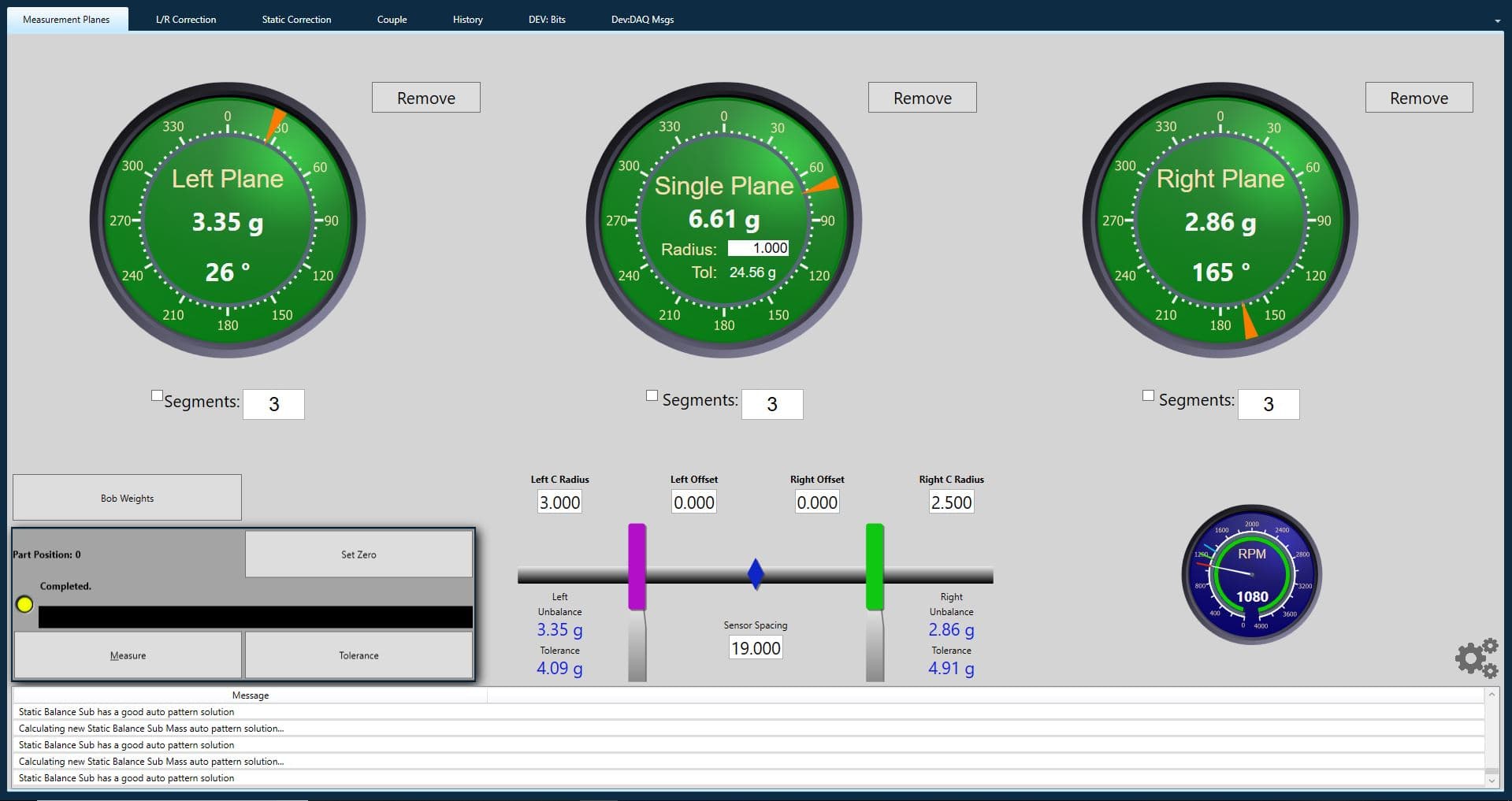
Each measurement spin takes approximately 3 seconds. The software processes the vibration data during the spin and displays the imbalance amount and correction angle immediately when the spin completes. Fast measurement cycles keep your operators productive and your balancing throughput high.
Step-by-Step Operator Guidance
The touchscreen interface walks operators through the entire balancing process in sequence. Each screen shows only the information and controls relevant to the current step. This guided workflow means new operators can start producing quality results on their first day without extensive training.
Production Logging and Reports
Every component balanced is logged with its measurements, corrections, and final balance quality. The system generates reports that can be printed or saved for quality documentation, customer records, or warranty support. No manual paperwork required.
Customizable Display
The software interface can be configured to show the measurement data in the format your operators prefer. Polar plots, bar graphs, and numeric readouts are all available. The display adapts to the component type being balanced, so crankshaft and driveshaft jobs each show the most relevant information.
Windows-Based Platform
Running on Windows means the system uses standard hardware components that are widely available and easy to service. The touchscreen display, computer, and peripherals are all standard commercial components, not proprietary hardware that requires factory service for every issue.
Compatibility
ProBal DBS software is included with all current ProBal balancing machines: the PB-L500 crankshaft balancer, the 510DL driveshaft balancer, and all ProBal electronics upgrade packages. The software is designed to work exclusively with ProBal measurement electronics and is not sold separately as a standalone application.
If your shop has an older balancing machine from any manufacturer and you want to run ProBal DBS software, the path is through a ProBal electronics upgrade. The upgrade replaces your existing measurement electronics and display with the ProBal system, which includes the DBS software. See our Balancer Upgrades page for details on which machines can be upgraded.
Software Interface
ProBal DBS software showing a 2-plane crankshaft balance measurement with correction values and angular positions.
Want to See ProBal DBS in Action?
Contact ProBal Dynamic Balancing for a software demonstration or to discuss which machine is right for your shop.
ProBal DBS software comes standard with every ProBal machine and upgrade package.
View Upgrade Options